
The Avi-on
BACnet Link

The BCS Link interfaces between Building Control Systems via BACnet IP to provide two-way building control integration. An Internet connection to the cloud is not required.
BACnet Link FEATURES
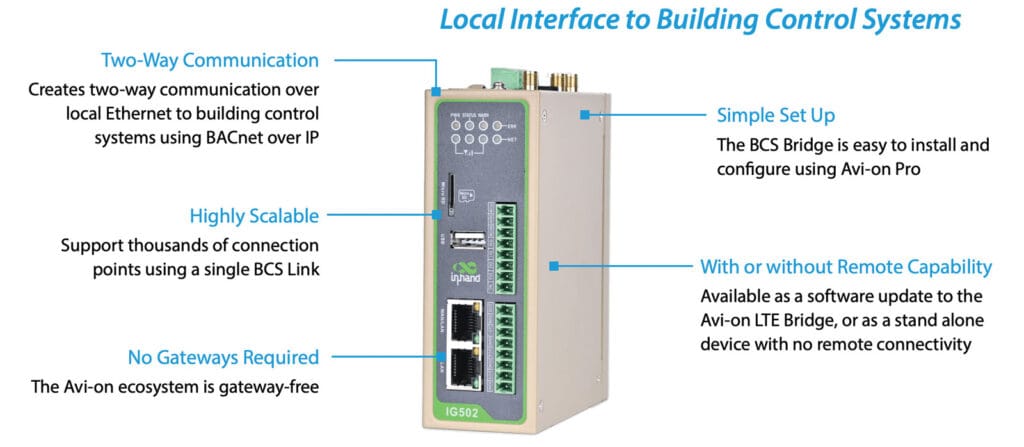
The BCS Link interfaces between Building Control Systems via BACnet IP to provide two-way building control integration. An Internet connection to the cloud is not required.
Supported Data Types
Data Export:
Device Status
Send real-time device status and dimming level changes from any Avi-on device.
Motion Triggers
Send an update to the BCS any time a motion sensor is triggered.
Daylight Values
Send an update to the BCS any time a daylight sensor updates the dimming level for a group of lights.
Fixture Energy Consumption Data
Send energy consumption data to the BCS every 15 minutes for all enabled data points using an Avi-on energy monitoring fixture controller (AVI-IFAC and AVI-XFAC).

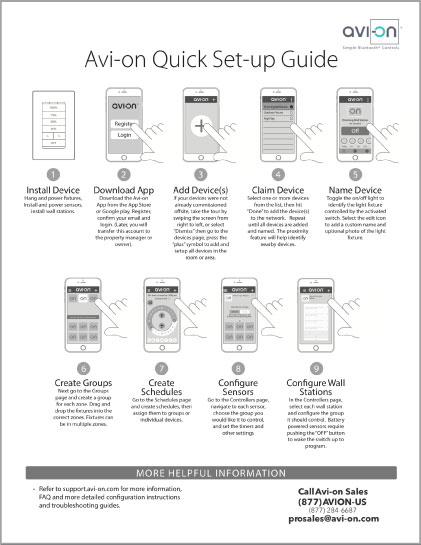 Quick Set-up Guide (PDF)
 Commercial Installation Guide (PDF)
Control import:
On/Off/Dim
Adjust dimming levels or on/off status for groups of lights or individual fixtures, and trigger scenes.
Special Schedules
Turn devices on or off for groups or individual devices using special holiday or override schedules.
Demand Response
Enable preprogrammed demand response modes from a BCS trigger.
Emergency Mode Triggers
Trigger emergency lighting mode on emergency circuits from a BCS (or any BACnet/IP-compatible) control signal.
BACNET LINK
PARTS & ORDERING
| Part Number | Product Name | Description |
|---|---|---|
| AVI-BACnet-LTE-UPDATE | BACnet Link Update | Remote communications and BACnet Link capability on a single platform. Remote configuration supported. |
| AVI-BACnet-LINK-V2 | Stand alone BACnet Link | Runs on identical, but physically separate hardware from the LTE Bridge. Local (in mesh) configuration only. |
To order please contact Avi-on sales at (877) AVION-US or prosales@avi-on.com
for order information or integration support.
SUPPORTED
BACnet MESSAGES
| Message | Functions | Data Type | Unit | Min Value | Max Value |
|---|---|---|---|---|---|
| Dimming | Read/Write | Real | Percent | 0 | 100 |
| Motion Sensing | Read | Binary | Binary PV | N/A | N/A |
| Energy Monitoring | Read | Analog Register Meter Reading | Watt Hours* 15 minute interval | 0 | 5242880 |
| Scene Triggers | Write | Binary | Binary PV | N/A | N/A |
| Color Changing | Read/Write | Analog Value | Degrees Kelvin | 2700 | 5000 |
To get kWh/15 minute interval consumption it is necessary to subtract the latest reading from the prior reading. A blank reading means data was not received for that interval. If the reading was lost, but the device was operating, the next interval that reports will include all the energy used since the prior received interval, so lost intervals will not cause loss of data. The interval is broadcast every 15 minutes at the end of the interval (latency <3 seconds). The receiving system should time stamp based on local system time.
When a device register value exceeds 5242880 or on a power cycle, the register value will reset to 0 and start again. Interpreting the data requires “rollover” logic to recognize these rollovers and produce a correct value. This is standard logic in BCS systems designed to handle ordinary meter reading data.
Specifications
Input Voltage Specifications
Supply Voltage (AC Power Supply): 110 – 240 VAC. 50/60HZ
Device Input (DC): 12 – 48 VDC
Power Consumption: 200 – 500 mA
Dimensions
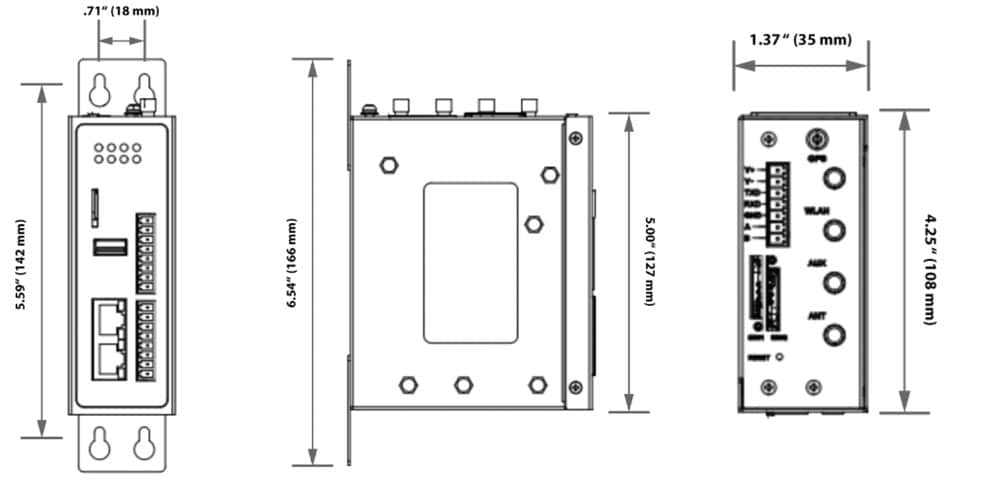
Length: 5.00“ (127 mm)
Width: 4.25 “ (108 mm)
Height: 1.37 “ (35 mm)
Certifications
USA
- Base Unit: FCC/ROHS/CE
- LTE: CE, FCC, PTCRB, Verizon Wireless, AT&T
- BLE: FCC, IC, BQB
Environmental
- Ambient Operating Temperature:-4°F to 158°F (-20°C to 70°C)
Storage Temperature: -40°F to 185°F (-40°C to 85°C)
System Communications
Ethernet RJ-15: 10 – 100 Mbps
Bluetooth Signal Frequency: 2402 – 2480 MHz
Bluetooth Wireless Range: 120 Feet*
LTE Signal (M2M LTE CAT1 (Update configuration only): Various MHz
LTE Wireless Range (Update configuration only): Tower and Location Dependent. Requires 2 bars of signal for reliable operation ⌃
⌃ Male-Female SMA Extension cable allows extending the LTE antenna up to 100F from the base unit

PORTS USED
These ports are only used by the Integrated LTE Bridge/BACnet link for remote access. No ports other than the user selected BACnet port are used for BACnet only configurations.
| Port | Use |
|---|---|
| All web content (hXps used exclusively for content) | TCP/44 |
| EMQTT protocol access RAB secure remote monitoring/management and firmware update (limited access, secured) | TCP/188 TCP/8883 (EMQTTS certificate verification port, which is open when required |
| Firmware upgrade (file, minio) | TCP/900 |
| Remotely access the RAB through ngrok for device management and monitoring | TCP/82 ngrokd generates HTTP management page links using port 82 TCP/82 ngrokd generates HTTP management page links using port 82 TCP/83 ngrokd generates HTTPS management page links using port 83 |
| AMQP Messaging Server (Avi-on Cloud to local Avi-on network messages) | TCP 5671 (amqp)
TCP 5672 (amqp)
Resolves over cloudamqp.com and aws.amazon.com |
| DNS lookup | TCP and UDP 53 (dns). 8.8.8.8 (google.com by default, can be changed)
Can be routed through cellular exclusively if desired |
| Heartbeat only (hXp) | TCP/80 Optional. If Closed, Uses 443 |
Install Guide
Download BACnet Link installation instructions.

Avi-on
featured products
The Avi-on family of products consists of load controllers, sensors, wall stations and connectivity products that work together in one big happy family. Load controllers manage dimming, schedules, scenes, groups/zones and more while the sensors are able to detect motion with all new state-of-the-art features. These products work seamlessly with the Avi-on cloud to provide a robust wireless ecosystem.